
Home › SEO Services › WordPress SEO Services
WordPress SEO Services
WordPress SEO Services With Strategy Behind Every Change.
WordPress SEO services should help your website attract the right customers, not just give you a green score in an SEO plugin. Your WordPress website might look great and have all the right plugins installed. But is it actually appearing when potential customers search for the services you offer?
At Seek & Signal, we help Australian service-based businesses make better use of their WordPress websites. From search visibility and SEO settings to keyword targeting and content, we focus on understanding what’s worth improving and why.
Make WordPress Work Harder for Your Business
- ●Search visibility and indexing
- ●WordPress SEO settings
- ●Service page optimisation
- ●Content and search performance
Research-Led SEO
WordPress-Specific Advice
Clear Priorities
What's Included in Our WordPress SEO Services?
WordPress gives you plenty of control over your website’s SEO. The challenge is understanding which settings, pages and improvements actually deserve attention. Our WordPress SEO services focus on four key areas.
01
WordPress SEO Settings and Indexing
We investigate how your WordPress website communicates with search engines, including relevant indexing directives, XML sitemaps, canonical signals and search appearance settings. An important service page that’s unintentionally excluded from Google’s index needs a different solution from a page that’s indexed but attracting the wrong audience.
Understanding that distinction comes first.
02
WordPress SEO Plugins and Configuration
Whether you use Yoast SEO or Rank Math, we review how the plugin is configured and whether its settings support your website’s needs. Having the plugin installed is only the starting point. We want to understand what it’s controlling, whether those controls are appropriate and whether anything is being overlooked.
03
WordPress Content and On-Page SEO
We improve relevant page content, headings, metadata and internal links based on keyword research and search intent. That includes considering how your WordPress theme or Elementor page builder presents important information. You can explore our broader on-page SEO services for more about how we approach page optimisation.
04
WordPress SEO Reporting and Improvements
We use Google Search Console and Google Analytics 4, where available, to understand how your important pages perform. A page attracting more visitors isn’t necessarily a successful page if those visitors aren’t looking for your services. We also consider search relevance, landing-page performance and measurable enquiries.
Why WordPress SEO Services Go Beyond an SEO Plugin
One of the biggest misconceptions about WordPress SEO is that installing a plugin means your website is optimised. Yoast SEO and Rank Math are useful tools. They make certain SEO settings easier to manage and can highlight elements worth reviewing. But their recommendations aren’t a substitute for understanding how people search.
Consider a physiotherapy clinic with a general services page. The clinic might have an optimised title, a relevant meta description and a green SEO plugin indicator. But what if it also specialises in vestibular rehabilitation and potential patients are specifically looking for help with dizziness and balance problems?
That creates a question worth investigating. Would those patients benefit from a dedicated page? What information do competing pages provide? Does the clinic have enough specialist knowledge to offer something genuinely helpful? Those decisions require keyword research, search intent analysis and an understanding of the business.
An SEO plugin can help manage a page. It can’t decide whether that page is the right answer to a customer’s search. That’s why our approach combines WordPress knowledge with a wider SEO strategy.
5 WordPress SEO Settings Worth Checking
Some WordPress SEO issues are easy to overlook because they aren’t visible when you’re browsing the website. Others are perfectly normal settings that become problematic only when they’re used incorrectly. Here are five areas worth understanding before deciding what needs fixing.
1.
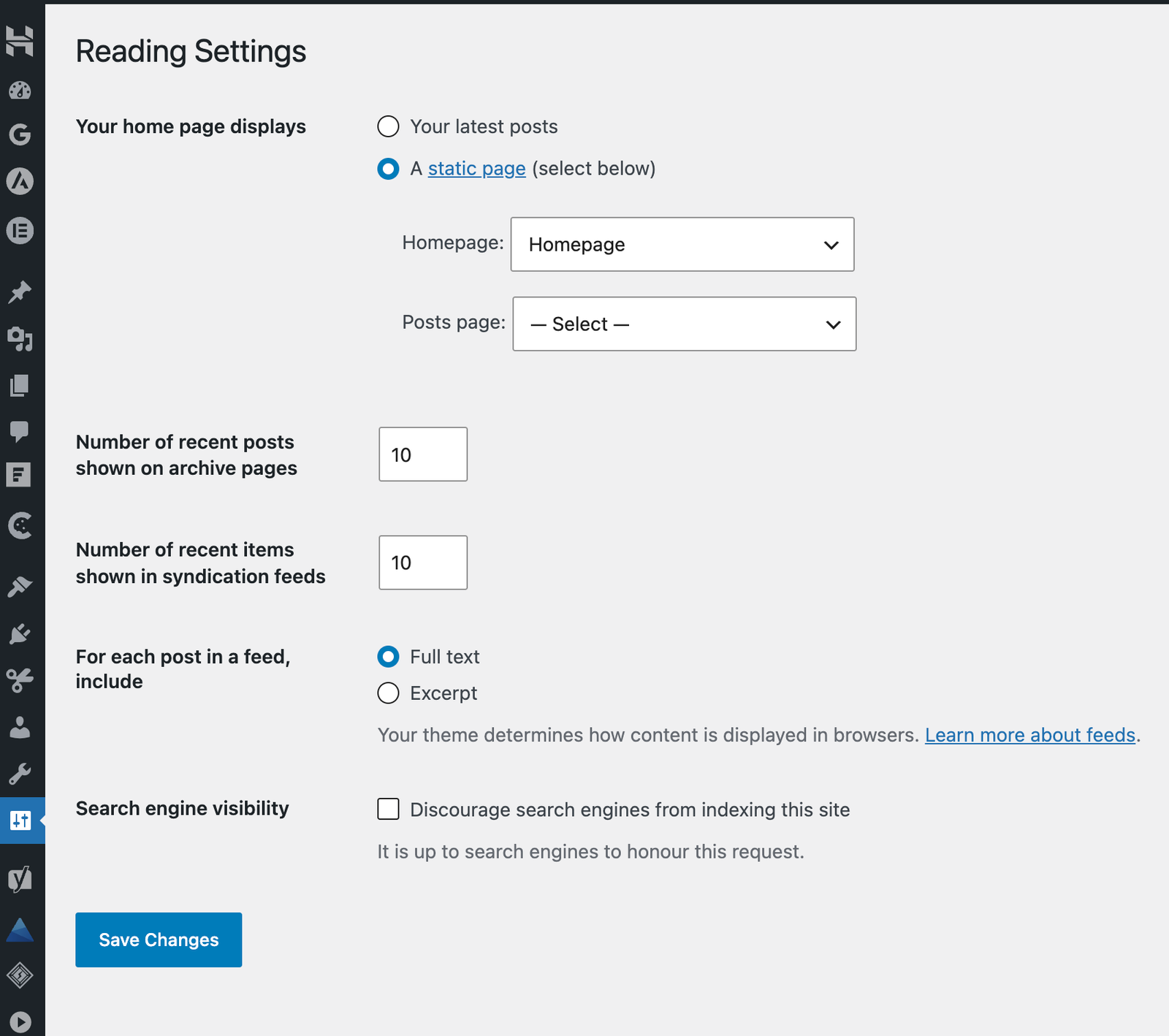
WordPress Search Engine Visibility Settings
Where to look: Settings → Reading
WordPress includes a setting labelled Discourage search engines from indexing this site.
It can be useful when a website is under development, but leaving it enabled on a live website intended to appear in search can create significant visibility problems.
WordPress explains the setting in its official Reading Settings documentation.
What We'd Look at Beyond the Checkbox
An unchecked box doesn’t automatically mean your pages are indexed.
Individual URLs can still have indexing restrictions, canonical signals may point elsewhere, and Google may decide not to index certain content.
That’s why we consider both the WordPress settings and the actual indexing information available in Google Search Console.
2.
Individual Page and Archive Indexing
WordPress websites can generate more URLs than business owners realise.
Alongside normal pages and blog posts, you may have categories, tags, author archives and other content types.
Some are useful. Others might exist simply because WordPress or a plugin created them.
For example, a category page containing a well-organised collection of articles about business tax obligations could be helpful to visitors.
A tag archive containing three unrelated articles might offer much less value.
Our approach is to assess the purpose of the page before changing its indexing settings.
Automatically applying noindex to every archive isn’t a strategy. Neither is allowing every archive to be indexed without checking what it contains.
3.
WordPress XML Sitemap Settings
Where to look: Your sitemap URL and relevant SEO plugin settings.
WordPress has built-in XML sitemap functionality, although SEO plugins may generate and manage sitemaps differently.
You can read about the native functionality in the official WordPress XML sitemap documentation.
A sitemap helps search engines discover URLs. But there’s an important distinction:
A working sitemap doesn’t mean every page listed in it will be indexed.
A service page could appear in your sitemap and still be excluded from Google’s index.
So rather than treating a valid sitemap as the end of the investigation, we consider whether important URLs are present, whether the indexing signals are consistent and what Google Search Console reports about those pages.
If Google isn’t indexing a page, the next step is understanding why, not repeatedly submitting the same sitemap.
4.
SEO Titles and Meta Descriptions
A page’s visible heading and the SEO title used to describe it in search aren’t necessarily the same.
Depending on your SEO plugin, you can customise these elements separately.
For example, an accounting firm’s WordPress page might simply be titled Services.
That tells a visitor very little about what’s available.
A more descriptive SEO title could communicate a specific service, its relevance and the business’s location where appropriate.
But we wouldn’t automatically add every available keyword or location to the title.
We’d consider what the page actually covers, the searches it’s targeting and whether the proposed title accurately represents its content.
Yoast explains how these fields can be managed through its SEO title and meta description settings.
5.
WordPress Permalink Structure
Where to look: Settings → Permalinks
WordPress allows you to choose how your website’s URLs are structured.
Clear, descriptive URLs are useful for both people and search engines.
However, changing an established URL structure isn’t something we’d recommend without good reason.
Consider a business whose service pages already receive organic traffic and have earned backlinks.
Changing those URLs simply to make them shorter could create unnecessary risks if the migration isn’t managed properly.
Existing links, redirects, canonical signals and search performance all need consideration.
You can review the available options in the official WordPress Permalink Settings documentation.
The key takeaway?
These are five settings worth understanding, not five settings every WordPress website needs to change.
A good SEO recommendation starts with identifying an actual issue or opportunity.
How We Prioritise WordPress SEO Improvements
A WordPress website can have dozens of SEO warnings. Some deserve immediate attention. Others have little practical impact on the business. We don’t believe the goal should be clearing every warning in a plugin dashboard. The better question is: Which improvements are most likely to help the website meet its objectives?
Here’s how that thinking works in practice.
| What we find | What we'd investigate | Potential recommendation |
|---|---|---|
| An important service page has a noindex directive | Whether the restriction is intentional and the page should be indexed | Correct the directive where appropriate |
| Several pages target almost identical searches | Whether the pages satisfy different search intentions | Improve, consolidate or differentiate content |
| A plugin reports good optimisation, but organic traffic is irrelevant | Whether the page targets the right searches | Reassess keyword targeting and content |
| Category archives provide little standalone value | Whether visitors benefit from those pages | Improve useful archives or review indexing decisions |
| Organic traffic is growing but enquiries aren't | Landing-page relevance and available conversion data | Improve content, enquiry pathways or measurement |
We also consider the likely value of each improvement. Correcting a genuine indexing restriction on an important service page may be more urgent than rewriting a meta description on a page that already performs well.
But if a website’s fundamental indexing is healthy, the stronger opportunity could be improving its service content or building more useful internal links. It’s about prioritising the right work, not simply doing more work. For a broader review of your website, explore our SEO audit services.
WordPress SEO for Service-Based Businesses
For service businesses, the purpose of SEO goes beyond increasing website visitors. You want people who are genuinely interested in what you offer to reach the information they need. WordPress gives you the flexibility to build those pages. The important part is knowing which ones are worth creating or improving.
When a WordPress Service Page Needs More Detail
Imagine an accounting firm offering bookkeeping, business tax and advisory services. Its website has a general services page, but business advisory receives only a short paragraph. If research reveals distinct search demand for advisory services, a dedicated page may be worthwhile. That page shouldn’t simply repeat the general services content.
It could explain the types of advisory support available, the business situations it addresses, how the service works and the questions potential clients commonly ask. The result is a page with a clearer purpose and more relevant information.
When Your WordPress Website Doesn't Need Another Page
Now consider a painting business targeting multiple neighbouring suburbs. It’s tempting to create a separate location page for every suburb. But if those pages contain nearly identical content with only the suburb name changed, what does the next page actually add?
We’d look at whether the locations have different customer needs, meaningful search opportunities or enough genuinely relevant information to warrant individual pages. Sometimes improving an existing service-area page is the more sensible option. This is also where local SEO and website content strategy need to work together.
More WordPress pages don’t automatically mean more search visibility. Every important page should have a reason to exist. Where genuinely useful new content is needed, our SEO copywriting services can help turn research and business knowledge into clear, search-focused pages.
What WordPress SEO Experts Should Handle and When You Need a Developer
WordPress gives business owners flexibility, but not every SEO concern can be resolved through the dashboard. SEO and website development overlap. Knowing where one ends and the other begins helps avoid unnecessary work.
At Seek & Signal, we focus on research, platform settings, search visibility, content and the SEO improvements included in your agreed service scope.
What we can help with
- ✓ WordPress SEO plugin settings
- ✓ Search visibility and indexing reviews
- ✓ Content and service page optimisation
- ✓ SEO titles, headings and internal links
- ✓ Keyword targeting and content strategy
- ✓ Identifying technical SEO concerns
What may need a developer
- ✓ Major theme modifications
- ✓ Complex plugin conflicts
- ✓ Custom PHP or JavaScript
- ✓ Advanced website speed remediation
- ✓ Website rebuilds
- ✓ Complex server or hosting changes
We can also review relevant SEO elements on WordPress websites built with Elementor. For example, a service page might need a clearer H1, better supporting content or more useful internal links. Those changes may be manageable through the normal editing interface. A problem caused by custom theme code is a different matter.
We’d rather explain when a developer is genuinely needed than recommend technical work simply because it sounds impressive. This helps businesses understand the purpose and scope of the recommendation before committing to it.
Our WordPress SEO Services Process
1.
Review Your WordPress Website
We look at your website’s setup, important pages, search visibility and available performance information. This helps establish what we’re working with and whether there are immediate issues worth investigating.
2.
Research and Prioritise
We combine our WordPress findings with keyword research, competitor analysis and your business objectives. Rather than producing an endless task list, we identify relevant opportunities and organise the work around clear priorities.
3.
Improve, Measure and Refine
We implement the SEO improvements included in the agreed scope, recommend specialist development support where required and monitor relevant performance data. From there, we can make more informed decisions about what deserves attention next.
WordPress SEO FAQs
Is WordPress good for SEO?
Yes. WordPress provides useful features for managing website content, URLs, internal links and search visibility settings. However, using WordPress doesn’t automatically mean your website will perform well in search. Your content, technical setup, competition and keyword strategy still matter.
Do I need WordPress SEO services if I already use Yoast SEO or Rank Math?
You may still benefit from professional SEO services. These plugins help manage important SEO settings, but they don’t replace keyword research, search intent analysis, competitor research or decisions about which pages your website actually needs. A website can have correctly configured SEO plugins and still miss valuable search opportunities.
Can you optimise a WordPress website built with Elementor?
Yes. We can review and improve relevant SEO elements on WordPress websites using Elementor, including page content, headings, metadata and internal links. If an issue requires complex template changes or development work, we’ll explain that separately.
How much do WordPress SEO services cost in Australia?
WordPress SEO pricing depends on the website’s size, existing condition, competition and the amount of work required. Our ongoing SEO packages start from $1,500 + GST per month, with research, optimisation, content and reporting included according to the selected package.
You can explore our SEO packages and pricing or contact us to discuss your WordPress website.
How long does WordPress SEO take to show results?
There isn’t a guaranteed timeframe. Some changes, such as correcting an unintended indexing restriction, may be processed relatively quickly once Google recrawls the page. Improvements involving content, competition and broader organic visibility often take longer. We focus on tracking meaningful progress rather than promising specific rankings or timelines.
Do I need a new WordPress website to improve SEO?
Not necessarily. Many SEO opportunities can be addressed through existing content, WordPress settings, service page organisation and internal linking. If underlying technical limitations are affecting the website, we’ll explain whether development work is appropriate.
Do your WordPress SEO services include speed optimisation?
We can identify performance concerns and explain their potential relevance to SEO. However, advanced speed optimisation, custom development and major technical remediation aren’t our core services. Where necessary, we’ll recommend working with an appropriate WordPress developer.
Let's Make Your WordPress Website Easier to Find
Your WordPress website doesn’t necessarily need more plugins, more pages or a complete rebuild. It needs informed decisions about which improvements will make the most meaningful difference.
At Seek & Signal, our WordPress SEO services help Australian service-based businesses understand their search opportunities, improve important pages and build a clearer direction for organic growth.
Tell us about your website and what you’d like to achieve. We’ll help you understand where SEO could make a difference.